


AI Video Editor: ShotCut AI
4.24.87K Reviews
App Specs
- Version
- 3.7.6
- Updated On
- License
- Free
- Downloads
- 50,000,000+
- Developer
- Shotcut Video Workshop
- Categories
- Video Players & Editors
- Platform
- Android
Screenshots
 Analysis by AppCompare
When I edit on a phone, the hardest part is often not choosing a filter; it is getting from a few scattered clips to something I’m happy to share without turning the task into a project. That is the sort of job I would consider AI Video Editor: ShotCut AI for. It is a video-editing app from Shotcut Video Workshop, and its mix of AI-assisted editing and familiar hands-on controls makes it appealing for quick personal videos, slideshows, and short social posts.
When a connection becomes part of the editing experience
Connectivity matters most when an editing workflow reaches beyond the clips already on your phone. If I am choosing footage, testing an automated suggestion, or preparing a finished video to share, a dependable connection can make the whole process feel more straightforward. I would plan a larger edit while connected rather than assume every part of the app behaves the same way on a weak signal. That is practical advice for any phone editor, but especially useful when an app presents AI-assisted tools alongside standard editing controls.
For a small, self-contained project, I would first gather the clips I want and decide on a simple sequence before opening the editor. That cuts down on aimless switching between the app and other services, and helps me judge whether the suggested edit actually fits what I intended. If a feature takes longer to respond than expected, I can still work out the story and clip order instead of repeatedly tapping and losing track of the plan.
Best suited to quick mobile projects
I see the strongest fit in everyday situations where the phone is already the camera and the finished video does not need a complicated production workflow: a family gathering, a weekend walk, a short trip recap, or a quick clip assembled for friends. A slideshow is another sensible use. Rather than opening desktop software for a handful of images and short clips, I can try shaping them into one compact piece on the same device where I captured them.
One useful habit is to decide the intended viewing context before editing. A video meant for a phone screen can often work with a tighter sequence and fewer embellishments than a piece intended for a larger display. I would make a short draft first, watch it from beginning to end, and only then spend time adjusting transitions or adding a voiceover. That makes it easier to spot whether the edit has a clear beginning and ending, rather than polishing effects that do not improve the story.
The app is less compelling if I need exact control over every frame, a carefully managed multi-track production, or a workflow built around transferring large projects between devices. In those cases, desktop software or a more specialized editor may be a better match. A mobile editor’s convenience is valuable precisely because it keeps a small job small; it does not automatically replace a more deliberate production setup.
What to do when an edit stalls
Rendering is the point where patience can matter. The published account of using the app notes occasional freezes on complex edits and says a restart usually helped. I would take that as a reason to protect the work through sensible project habits, not as a reason to assume every export will fail. Keep a complex edit manageable, review it before committing to a final render, and avoid making a string of rapid changes while the app is busy.
Worth Reading Before You Choose

Flipboard Shows What News Apps Must Do Beyond the Feed

Switching to Android Auto Means Rethinking Your Driving Routine

Google Calendar Makes a Crowded Week Easier to Manage

Ludo King Makes the Most of the Minutes Between Plans

Baby Panda World Brings Quick Play to Modern Phones, but Its Game Library Feels Busy

ESPN’s Live Game View Makes Following Close Games Easier
If the app appears stuck, I would give it a moment before tapping repeatedly, then reopen it if it does not recover. For a video that matters, I would also keep the source clips available until I have watched the exported result. That simple check catches a bad cut, missing narration, or an unexpected ending before I share the file. It is a small extra step, but it is more useful than trusting an export merely because the progress indicator finished.
Making sensible choices about data and time
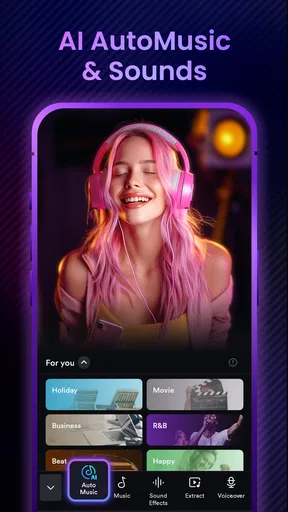
AI tools can make editing feel quicker, but I would treat their suggestions as a first pass rather than an editorial decision. If an automatic trim removes a pause that gives a moment its meaning, I would put it back; if a recommended music choice competes with a spoken voice, I would favor clarity. The point is not to accept every suggestion, but to use it to get past the blank-timeline stage and then make the result feel personal.
When I am trying to limit mobile data, I would prepare footage and make editing decisions over a reliable connection, then avoid unnecessary repeated uploads or exports until I know what I want. I would also check the app’s in-app purchase prompts before committing to any paid option: the app is free to download, while individual purchases range from $0.99 to $119.99. That range makes it worth pausing to understand what a purchase covers rather than tapping through on autopilot.
Getting Started with AI Video Editor: ShotCut AI
First things first, downloading ShotCut AI is a breeze. Available on both Android and iOS, the app weighs in at a decent size, so make sure you have some space. Once you open the app, you’re greeted with a sleek, intuitive interface that's easy to navigate even for beginners. The app doesn't overwhelm you with options, yet offers a robust set of features. A win-win!
Features That Stand Out
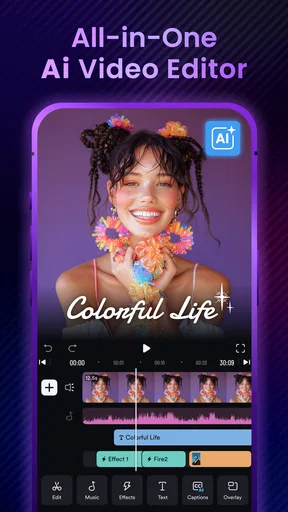
One of the standout features of ShotCut AI is its AI-powered editing capabilities. Imagine this: you upload a video, and the app automatically suggests edits. This includes trimming, adding effects, and even recommending music that fits the mood of your footage. It’s like having a mini director in your pocket.
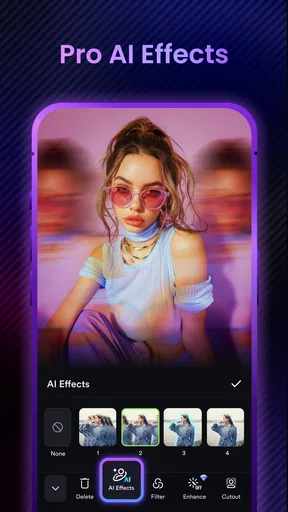
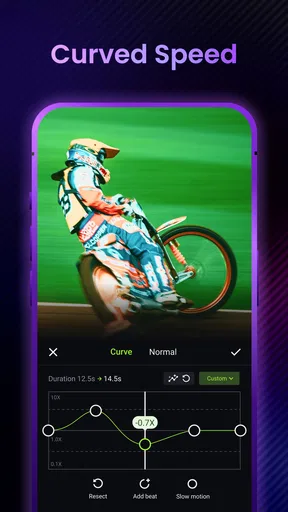
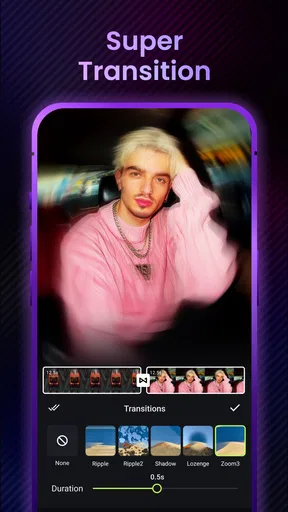
The app also boasts a variety of filters and transitions. Whether you're looking to create a cinematic masterpiece or just a quick social media post, the range is impressive. The transitions are smooth and can be applied with a simple tap. No need to be a tech wizard here!
Ease of Use
As someone who’s dabbled in video editing, I appreciate the simplicity this app offers. The drag-and-drop functionality is seamless. Editing on a small screen can be tricky, but ShotCut AI makes it feel surprisingly natural. The timeline is easy to manage, allowing you to snip and rearrange clips with ease.
Another cool feature is the voiceover option. You can record directly onto your video, and the app syncs it perfectly. It’s a great tool for vloggers or anyone looking to add a personal touch to their videos.
Performance and Reliability
Now, let’s talk about performance. I tested ShotCut AI on both an Android and an iPhone. The app runs smoothly, with minimal lag. Exporting videos is quick, and the quality is top-notch. You can choose from different resolutions based on where you plan to upload your video.
However, like any app, it’s not without its occasional hiccups. There were moments when the app froze while rendering a particularly complex edit, but these were few and far between. A quick restart usually resolved the issue.
Final Thoughts
Overall, AI Video Editor: ShotCut AI is a fantastic tool for anyone looking to dip their toes into video editing. Whether you’re a newbie or someone who edits regularly, the app offers something for everyone. Its blend of simplicity and powerful features makes it a must-have in your app arsenal.
If you’re on the hunt for a reliable, user-friendly video editor that doesn’t compromise on quality, give ShotCut AI a try. It just might become your go-to app for all your video editing needs.
Who I would recommend it to
The app’s broad appeal is reflected in its 4.3 average from around 373,000 ratings, while more than 50 million installs suggest that many people have tried it. It is rated for Everyone, and version 3.2.1 is listed for devices running Android 8.0 or later. Those details make it easy to see why a casual creator might give it a look, but they do not change the practical question: does its mobile-first approach suit the project in front of you?
I would recommend it to someone who wants to make a tidy, shareable video without learning a full desktop editor first. The AI suggestions can help break the initial hesitation of deciding where to begin, while the timeline gives room to correct choices that do not fit. If your usual edits are short and you value working directly on your phone, that combination is more useful than a long list of advanced controls you may never touch.
For a more demanding project, I would compare it with the usual alternatives in the video-editing category by asking what matters most. A basic built-in phone editor is often enough for trimming one clip or making a quick crop; a desktop editor is preferable for intricate layers and precise finishing. ShotCut AI sits between those approaches: more ambitious than a bare-bones trim tool, but still centered on quick mobile work rather than a workstation-style process.
A realistic workflow from clips to a finished video
Imagine I have a few short clips from a day out and want to send a recap to family. I would first pick the moments that tell the day’s story, not every clip I recorded. In the app, I could arrange those moments, use an AI suggestion as a starting point, then review the cuts in sequence. If the chosen music makes conversation difficult to hear, I would adjust the edit rather than accept a mood-based recommendation automatically. A brief voiceover can add context that the footage itself does not capture.
Before exporting, I would watch the whole piece once without stopping. That is when small problems become obvious: a transition that feels too decorative, a clip that lingers, or a voiceover that starts before the image makes sense. I would then choose a resolution that suits where I plan to share it, rather than automatically selecting the largest option. The best setting is the one that looks good for the intended audience without making a simple share needlessly cumbersome.
Where I would draw the line
ShotCut AI is not my first choice when the project depends on exact timing, elaborate sound design, or a tightly controlled professional handoff. On a phone, even a manageable timeline can become fiddly as a project grows, and a complex render may be less comfortable than working on a larger screen. If the result needs repeated revisions from several people, I would favor a workflow designed around collaboration and file management rather than assume this app will cover every production need.
I would also avoid treating an AI-generated edit as a finished creative decision. Automated trimming and music recommendations can save time, but they cannot know which detail matters to the people in the video. The strongest results come when I use those tools to speed up routine choices, then make the final calls myself. That balance is the app’s appeal—and its limit.
My connectivity verdict
For me, connectivity shapes convenience more than the basic idea of editing: a stable connection is sensible when a workflow depends on online activity or when I am preparing to share a finished video, while a weak signal is a good reason to keep the task simple and avoid repeated attempts. I would not plan a deadline around an uncertain connection. Instead, I would organize the clips, make deliberate edits, and leave time to review the exported file before sending it.
With a 4.8K-review footprint and a free starting point, Shotcut Video Workshop’s editor is easy to consider, though optional in-app purchases mean I would check costs carefully before choosing anything paid. For quick edits, slideshows, and personal videos, I find its accessible controls and AI assistance a useful pairing. If your work calls for detailed control or a more robust production pipeline, a different editor will serve you better. For an everyday phone project, though, I would be comfortable trying it and judging the result on a small, low-stakes video first.
Pros
- Intuitive interface for easy editing.
- Wide range of AI-driven effects.
- Fast rendering without quality loss.
- Supports multiple video formats.
- Regular updates with new features.
Cons
- Limited free version features.
- Occasional lag on older devices.
- In-app purchases can be pricey.
- Requires internet for some features.
- Needs more export options.
FAQs for AI Video Editor: ShotCut AI
What are the main features of AI Video Editor: ShotCut AI?
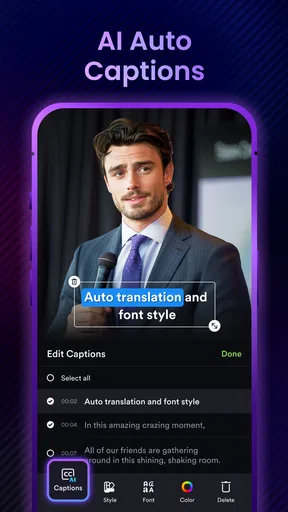
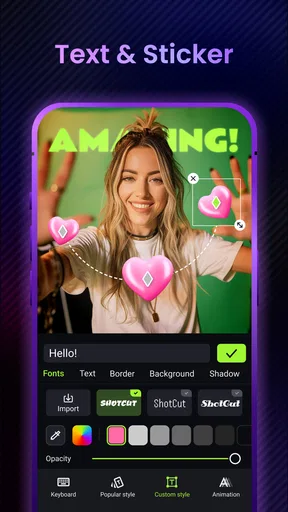
AI Video Editor: ShotCut AI offers a variety of features, including automated video editing, AI-driven effects, and a user-friendly interface. It allows users to trim, cut, and merge videos effortlessly. The app also includes features like text overlays, filters, and transitions, making it a versatile tool for both beginners and professionals.
Is AI Video Editor: ShotCut AI suitable for beginners?
Yes, AI Video Editor: ShotCut AI is designed to be user-friendly, making it suitable for beginners. The intuitive interface and guided tutorials help new users navigate the app easily. The AI-powered features assist in automating complex editing tasks, allowing novices to create professional-looking videos with minimal effort.
Does AI Video Editor: ShotCut AI support multiple video formats?
AI Video Editor: ShotCut AI supports a wide range of video formats, ensuring compatibility with most video files. Whether you're working with MP4, MOV, AVI, or other common formats, the app's robust processing capabilities allow you to edit and export your projects seamlessly without any conversion issues.
Are there any in-app purchases or subscription fees?
AI Video Editor: ShotCut AI offers a free version with basic features. However, to unlock premium tools and effects, users can opt for in-app purchases or a subscription plan. The subscription provides access to advanced editing tools, exclusive effects, and regular updates to enhance your editing experience.
How does the AI functionality improve video editing in ShotCut AI?
The AI functionality in ShotCut AI enhances video editing by automating repetitive tasks, such as clipping and sequencing. It analyzes the content to suggest optimal edits and effects, saving users time and effort. This smart feature allows for quick creation of polished videos, even for complex projects, ensuring high-quality results.


